Arabic Letters Not Connecting or Reversed? Causes and Fixes by App
Arabic letters not connecting, or words that read backwards, are rarely the font’s fault: the app that draws the text is skipping one of two jobs, shaping or bidirectional ordering. This guide gives you a test line to paste, a diagnosis by symptom, and the exact fix for design tools, video editors, game engines, the web and PDF files.
The 30-second test: paste one line
Copy this sentence, لا يستطيع أحد قراءة 120 صفحة في ساعة (“no one can read 120 pages in an hour”), and paste it into the app that fails:
لا يستطيع أحد قراءة 120 صفحة في ساعة.- Joining. يستطيع (yastaṭīʿ) is made only of letters that join on both sides, so it must be one unbroken shape. Gaps after ا, أ, ء, د, ر, ز, و and ة are normal: those letters never join the next one.
- Lam-alif. لا (lā) must be a single ligature, not a lam standing next to an alif.
- Order. The line starts on the right with لا, and the full stop sits at the far left.
- Digits. 120 still reads 120, left to right, inside the right-to-left sentence.
Then change only the font, to Noto Naskh Arabic or Amiri. If the problem disappears, the old font was at fault. If it stays, the app is.
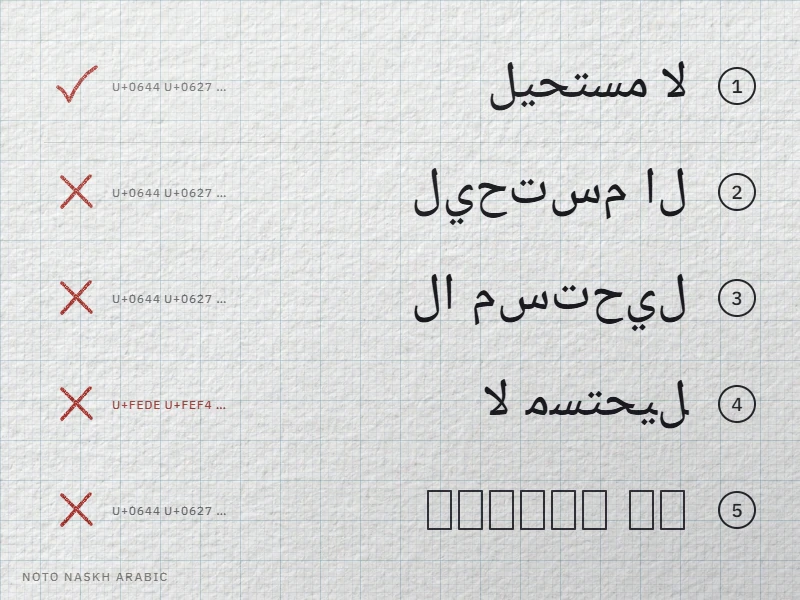
| What you see | Cause | Where to go |
|---|---|---|
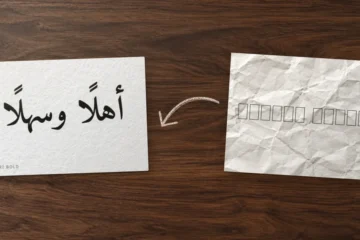
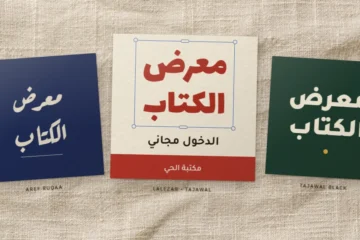
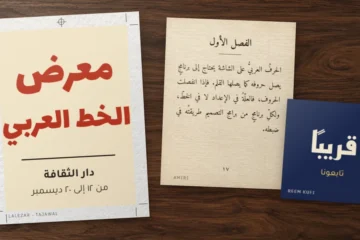
| Isolated letters, correct order (2) | No shaping, or a font without Arabic layout rules | Shaping |
| Isolated letters, read left to right (3) | No shaping and no bidi | App by app |
| Joined pieces in reverse order (4) | Text converted to presentation forms | Converted text |
| Empty rectangles (5) | No Arabic glyphs in the font | Boxes |
| Full stop or number at the wrong end | Paragraph direction | Punctuation |
Arabic letters not connecting: the app is not shaping
Unicode stores one code per Arabic letter. The shape you see is chosen at display time: a letter that joins on both sides has four forms (isolated, initial, medial, final), and the Unicode Standard, chapter 9 makes the lam-alif ligature obligatory when the font style supports it. Picking those forms is the job of a shaping engine: HarfBuzz (used by Chrome, Firefox, Android, Photoshop, Illustrator, InDesign, Figma and Canva, among others), Uniscribe or DirectWrite on Windows, Core Text on Apple systems.
When no engine runs, the app draws the default glyph of each code, which is the isolated form. The letters come out separated. Typical causes:
- A text engine that does not shape: TextMesh Pro in Unity, old versions of After Effects and Premiere Pro left on their Latin text engine, or custom code that draws characters one by one.
- A Latin setting on the paragraph: in Illustrator and InDesign, the composer is a paragraph setting, so text set with a Latin composer stays disconnected until you switch it in the Paragraph panel menu.
- Spacing and letter-by-letter effects: set tracking to 0 on Arabic, since extra letter spacing pulls joined letters apart. If an animation or effect is applied, test the same line with it switched off.
- A font without Arabic layout tables: the glyphs may exist, but without the OpenType rules (
init,medi,fina,rlig) that pick them, even a good app can only show isolated letters. In our catalog, Fandogh is such a font: its file contains no initial, medial or final forms, so every app sets its letters apart. The font swap from the test settles it.
Arabic text reversed: no bidi, or text that was “converted”
Arabic is stored in reading order, first letter first. Turning that logical order into a right-to-left line is the work of the Unicode Bidirectional Algorithm (UAX #9). An app without it lays characters left to right, so the sentence reads backwards. That is case 3 in the picture, usually combined with missing shaping.
Case 4 is trickier: the letters look joined, yet the word reads backwards. Someone ran the text through a “converter” that swaps each letter for a frozen contextual form from the Arabic Presentation Forms blocks (U+FB50–U+FDFF and U+FE70–U+FEFF) and reverses the order, so that an app with neither shaping nor bidi displays it correctly. Paste that text anywhere that does handle Arabic and it comes out reversed. The Unicode Standard keeps those blocks for compatibility and says they should not be used in general interchange. Converted text also breaks search, spell checking, screen readers and copy-paste.
Check what you have. In Word on Windows, place the cursor after an Arabic letter and press Alt + X: Word replaces the character with its hexadecimal code (press again to undo). A code starting with 06 is a normal letter; a code between FB50 and FEFC means converted text.
Fix it. Go back to the original text, or retype it; our online Arabic keyboard turns Latin letters or Arabizi into Arabic you can paste. Developers can recover base letters with Unicode normalization (NFKC maps presentation forms back to their 06xx letters, and lam-alif to two letters), then reverse the Arabic runs of each line, leaving digits and Latin words in order. Figma files from the plugin era are a known case: Figma now handles right-to-left text natively and offers an Upgrade button in the Type details panel for text edited with older RTL plugins.
Boxes, question marks and gibberish instead of Arabic
- Empty rectangles (“tofu”): the font has no glyph for those characters and the app has no fallback. Many display fonts are Latin-only. Canva shows
[x]or▯: its help page tells you to pick a font from the “Fonts in your language” section of the font menu. Figma falls back to a Noto font on its own. - Question marks: the characters were lost when the text was saved in a non-Unicode encoding. The font cannot bring them back; recover the source.
- Latin gibberish such as
العربية: UTF-8 bytes read as Windows-1252. That string is العربية (al-ʿarabiyya). Reopen or import the file as UTF-8.
Punctuation and numbers on the wrong side
If the letters are fine but a full stop opens the sentence, or a phone number comes out scrambled, the bidi algorithm works and the paragraph direction is wrong. Unless the app sets it, UAX #9 takes a paragraph’s direction from its first strong character: a subtitle line that starts with a Latin brand name can become left-to-right, and the final full stop of the Arabic sentence lands on the right.
- Set the paragraph or text box to right-to-left (in HTML,
dir="rtl", ordir="auto"for user content). - Where you cannot, insert an invisible mark. RIGHT-TO-LEFT MARK (U+200F) at the start of the line or after the final punctuation pulls neutral characters to the Arabic side. LEFT-TO-RIGHT MARK (U+200E) before a phone number or a range keeps it in left-to-right order. ARABIC LETTER MARK (U+061C) works like RLM but also makes the digits that follow behave as Arabic numbers.
- Check the result. In a right-to-left paragraph in Chrome, we typed من (“from”), the range
10-20and صفحة (“pages”): the range displayed as20-10. With U+200E typed before 10, it displayed as10-20.
For subtitles, Subtitle Edit has Edit › Fix RTL via Unicode control characters, which adds these marks to the selected lines.
Fixes app by app
| App | What to check |
|---|---|
| Photoshop | Since version 23.0 (October 2021), the Unified Text Engine shapes Arabic with HarfBuzz and orders it with FriBidi, with no setting to change. Disconnected letters point to an older version or an old file: our guide to Arabic in Photoshop, Illustrator and InDesign covers the details. |
| Illustrator, InDesign | In the Paragraph panel menu, pick a Middle Eastern composer (Illustrator) or the Adobe World-Ready Paragraph Composer (InDesign). Adobe ties the full right-to-left controls to the Arabic and Hebrew versions of these apps. |
| After Effects, Premiere Pro | The December 2021 releases (22.1) brought the Universal Text Engine: type Arabic directly. In earlier versions that offer it, set the Text Engine preference to South Asian and Middle Eastern, then restart. |
| Figma | Native right-to-left support, Text › Text direction menu. Upgrade old plugin text. |
| Canva | Shapes Arabic. Boxes mean the font: pick one under “Fonts in your language”. Font choice and uploads are covered in our guide to Arabic fonts in Canva. |
| Unity | TextMesh Pro does not shape Arabic: use the MIT-licensed RTLTMPro plugin. With UI Toolkit, enable the Advanced Text Generator (HarfBuzz and ICU) in Project Settings › UI Toolkit; it is off by default in Unity 6.3 LTS. |
| Unreal Engine | Leave Text Shaping Method on Auto or FullShaping; KerningOnly applies kerning but no shaping, so Arabic breaks. |
| Godot 4 | The default Advanced text server (HarfBuzz, ICU) handles Arabic; the Fallback text server does not. |
| Microsoft Word | Word shapes Arabic. The usual issues are the complex script font and paragraph direction, covered in our guide to Arabic in Microsoft Word. |
| Websites | Browsers shape Arabic. Look for a web font subset stripped of its Arabic glyphs or layout tables, letter-spacing on Arabic text, or a missing dir. Our guide to Arabic font CSS covers safe subsets and font stacks. |
Unity and presentation forms. RTLTMPro does its job by swapping letters for presentation forms, so the font asset must contain them; the plugin ships range files that include U+FE70–U+FEFF. We checked the TTFs in our downloads: Amiri and Noto Naskh Arabic map every Arabic form in that block, while Tajawal and Cairo lack 51 of its code points, including every isolated letter form. Pick the first two for an RTLTMPro project, or test your own font before building the atlas.
Any app without a fix has one fallback: set the line in Photoshop, Figma or Canva, export a transparent PNG (a paid-plan option in Canva) and place it as an image. For titles in edits, start from fonts tested on screen in our list of Arabic fonts for video.
Copying Arabic out of a PDF
A PDF stores glyphs, not letters. To give text back on copy, the reader relies on a ToUnicode map in each font, or on ActualText replacement strings, both defined in the PDF specification (ISO 32000-1, clauses 9.10 and 14.9.4). When the map is missing or points to presentation forms, you paste scrambled letters, separated forms or a reversed line. Readers also rebuild the reading order by guesswork, so two readers can give two results.
- Ask for the source file (Word, InDesign): it is the only reliable fix.
- Try another reader: the reconstruction differs from one to the next.
- If the paste holds codes between FB50 and FEFC, normalize it as described above, then proofread every line.
- When you make PDFs, export from the original app rather than printing to an image, keep Word’s “Document structure tags for accessibility” option checked, and test copy-paste before you send.
FAQ
Why does Arabic look fine in Word but broken in my game?
Word uses the Windows text stack, which shapes Arabic and applies bidi. A game engine draws text with its own renderer, and many of those still place glyphs one by one. The fix sits in the engine or a plugin, not in the font.
Can an online converter fix reversed Arabic text?
Only for an app that has neither shaping nor bidi, and only as a last resort: the output is made of presentation forms, it cannot be searched or edited cleanly, and it breaks as soon as it reaches an app that handles Arabic properly. Keep the original text and fix the app instead.
Which fonts are safest?
Fonts with complete Arabic OpenType tables and broad coverage, such as the Noto and Amiri families among our Naskh fonts. Install every weight you need before testing: our guide on how to install Arabic fonts covers Windows, macOS and Linux.