How to Install Arabic Fonts on Windows, macOS and Linux
How to install Arabic fonts comes down to two steps. Extract the zip, then install only the .ttf or .otf files at its top level: right-click and Install on Windows, double-click and Install in Font Book on a Mac, or copy them to ~/.local/share/fonts and run fc-cache -f on Linux. This guide also covers installs for every user, variable fonts in menus, a two-minute rendering test and fixes for fonts that won’t show up.
What you get in the zip
Every family in our catalog, 109 in October 2026, downloads as one zip named after the family. Inside are the designer’s original desktop files, unchanged, and a LICENSE.txt, sometimes with notices or sources. The font files come in two shapes.
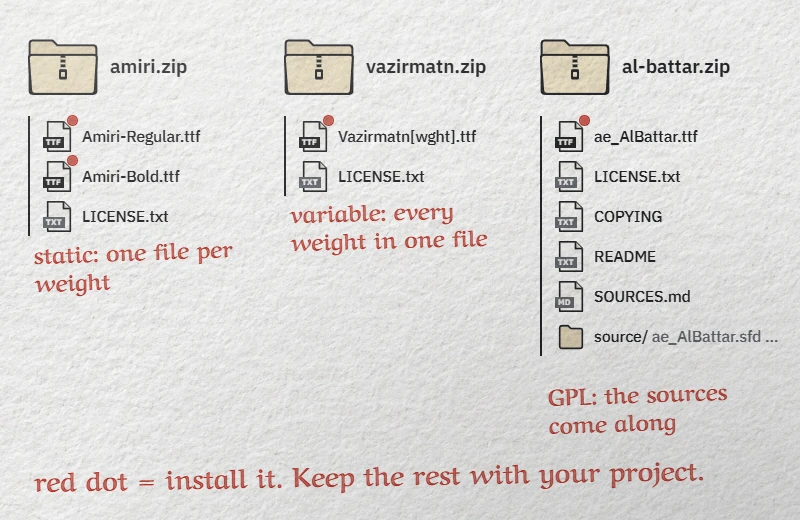
- Static fonts: one file per weight. Amiri ships
Amiri-Regular.ttfandAmiri-Bold.ttf; Tajawal ships seven files, from ExtraLight to Black. Install every weight you plan to use. - Variable fonts: a whole range in one file. 31 families came this way in October 2026: one file, or two for the families that add an italic. The axes often appear in the file name:
Vazirmatn[wght].ttffor Vazirmatn (weight),Cairo[slnt,wght].ttffor Cairo (weight and slant). You install one file and get several weights.
All but one family use TrueType .ttf files. Unifont is the exception, delivered as a single .otf. Both formats install the same way.
Keep the license file with your working files. In October 2026, 92 families used the SIL Open Font License 1.1, two the Apache License 2.0, and 15 the GNU GPL with a font exception: ten Arabeyes families, such as AlBattar; the two GNU FreeFont families; and the three PakType families. All three licenses allow commercial use and embedding in documents (Word still obeys each file’s embedding flag: see our Word guide, linked below). The font exception means that a document or PDF that embeds the font does not fall under the GPL itself.
The GPL families arrive with their source files: .sfd files, build scripts, and a COPYING file for the Arabeyes families. The GPL requires anyone who passes the font on to provide its source, so we ship it with the font. A few other families include sources too. Keep them if you pass the font on, but install only the .ttf or .otf files at the top level of the zip. The PakType zips hold intermediate .ttf files in their sources folder, under the same family name as the final font: installing them would duplicate the font in your menus.
| File | What it is | Install it? |
|---|---|---|
.ttf, .otf at the top level of the zip |
Desktop font, static or variable | Yes |
LICENSE.txt, COPYING, README, NOTICE.txt, SOURCES.md and other text files |
License, notices and origin of the files | No, keep them |
Source files: the source/ or sources/ folder (including the PakType intermediate .ttf), plus archives and scripts at the top level (.sfd, .tar.gz, .zip, .py) |
Sources, provided with the GPL fonts among others | No |
.woff2 |
Web font, loaded by a browser | No. The previews on our font pages are WOFF2 files cut down for the web: download the zip instead |
Extract first. Windows can preview a font from inside a zip, but Microsoft’s own instructions start by extracting the files. Right-click the zip, choose Extract All, and work from the extracted folder.
Windows 10 and 11: for you or for all users
- Open the extracted folder and select the font files. For a family such as Tajawal, select all seven at once.
- Right-click the selection and choose Install. Double-clicking a single file does the same: a preview window opens with an Install button at the top.
- To make the font available to every account on the PC, choose Install for all users instead. On Windows 11, if you don’t see it, choose Show more options first (or press Shift+F10). Windows asks for administrator approval.
A plain Install is per-user: no admin rights, and the files go to %LOCALAPPDATA%\Microsoft\Windows\Fonts. Install for all users copies them to C:\Windows\Fonts. Microsoft notes that not every app supports custom fonts, and some programs only see fonts installed for all users. If one program still cannot see a font that the others list, reinstall it for all users.
Installed fonts are listed in Settings › Personalization › Fonts, under Available fonts, where you can search, preview, hide or uninstall them. Quit and reopen any app that was running during the install, or it may not see the new font.
macOS: Font Book
- Double-click the font file in the Finder, then click Install. You can also drag the files onto the Font Book window, or choose File › Add Fonts to Current User.
- Font Book validates each file on the way in and warns you about duplicates. A green icon means the font is valid, yellow is a warning, red is a failure: remove a failed file and download the zip again rather than forcing it.
- To recheck a font later, select it and choose File › Validate Selection.
Where the font lands depends on Font Book › Settings › Default install location. Current User puts it in ~/Library/Fonts, for your account only. All Users puts it in /Library/Fonts for every account and asks for an administrator password. Apple lists TrueType, variable TrueType and OpenType files among the supported formats, so every font file in our zips installs as is.
The Arabic families that come with macOS, such as Geeza Pro or Baghdad, are licensed for use on your Mac. Check Apple’s license before you hand their files to a printer or put them on a website. A family under the OFL, Apache or GPL with font exception can travel with your project.
Linux: fonts folder and fc-cache
GNOME Fonts and KDE’s font viewer both show an Install button when you open a font file. From a terminal, the same three steps work on every distribution:
- Copy the font files to
~/.local/share/fonts/(create the folder if needed). One subfolder per family keeps updates simple. - Rebuild the font cache:
fc-cache -f. - Check the result.
fc-list :lang=ar familylists every installed family that covers Arabic;fc-match "Vazirmatn"shows which file answers to a name. If it returns another font, the name is wrong or the cache is stale.
For every user of the machine, copy the files to /usr/local/share/fonts/ with sudo, then run sudo fc-cache -f. Docker images and CI runners that generate PDFs need the same two steps in their build file. Without them, Arabic falls back to whatever font is present, or to empty boxes.
Variable fonts: what shows up in your menus
A variable font holds a continuous range, but most font menus only list its named instances, the positions the designer gave a name to. Windows, for one, registers every named instance as a separate face. In practice:
- Vazirmatn has nine named instances, Thin to Black: one file, nine weights in the menu.
- Cairo has eight, ExtraLight to Black. Its weight axis runs up to 1000, but no instance is named there, so a plain menu cannot reach that weight.
- Noto Sans Arabic has a width axis from 62.5 to 100, yet its nine named instances are all at full width. A condensed setting only exists in software that exposes the axes, such as Adobe’s design apps.
- Sahel has no named instance at all: menus show a single weight, under the name Sahel VF (Sahel VF Regular in Word).
Never install the variable file and static files of the same family side by side: two faces with the same name confuse menus and print drivers. Our zips never mix the two. Note also that Canva does not accept variable fonts, so the variable families cannot be uploaded there as delivered.
Three cases to know before you blame the font
- Graphite fonts. Awami Nastaliq installs like any other font, but SIL states that only Graphite-enabled software renders it: Firefox, LibreOffice, XeTeX and SIL’s language tools. SIL adds that Graphite has sometimes been disabled by default in Firefox, so you may have to switch it on. It will not work in Microsoft Office, and Chrome and Adobe apps are not on SIL’s list. For Nastaliq in everyday software, use Noto Nastaliq Urdu or Gulzar.
- Fonts without Latin letters. In October 2026, thirteen families in the catalog had no Latin alphabet, Sahel and Droid Arabic Naskh among them, and these two have no Western digits either. Your app then borrows those characters from another font. Choose that partner yourself instead of leaving it to the fallback.
- Menu names that differ from the file. The AlBattar file is
ae_AlBattar.ttf, but menus say AlBattar. Search the font menu by family name, never by file name.
Test the font in two minutes
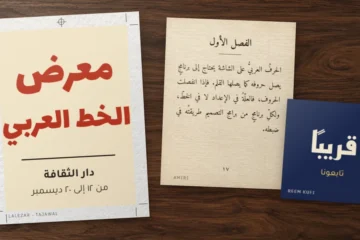
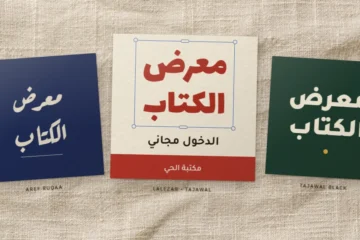
A font that installs is not always a font that renders Arabic correctly in your app. Before you set a whole document, type these four lines in the new font, as on the card below.
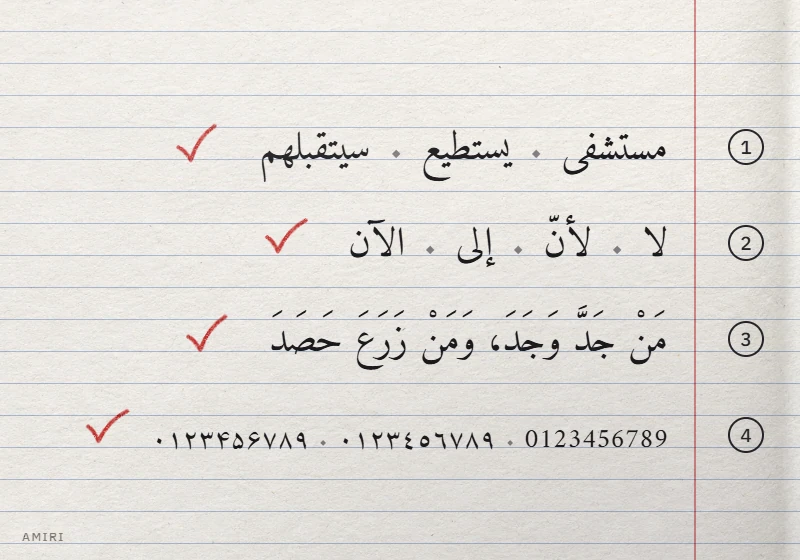
- Joining: مستشفى · يستطيع · سيتقبلهم. In يستطيع (yastaṭīʿ, “he can”), every letter connects to its neighbors, end to end. Six letters never join the letter after them: ا (alif), د (dāl), ذ (dhāl), ر (rāʾ), ز (zāy) and و (wāw). A gap after them is normal; a gap anywhere else is not.
- Lam-alif: لا · لأنّ · إلى · الآن. In لا (lā) and الآن (al-ān, “now”), the lam followed by the alif forms a mandatory ligature, never a lam next to a separate alif.
- A shadda carrying a vowel: مَنْ جَدَّ وَجَدَ، وَمَنْ زَرَعَ حَصَدَ (man jadda wajada, wa-man zaraʿa ḥaṣada, “whoever strives, succeeds; whoever sows, reaps”). The shadda, الشدة (ash-shadda), must sit on its letter with the fatha above it. This test is also a frequent failure point. Among the defects our catalog test confirmed with the designers’ original files: Changa, Lemonada and El Messiri (mostly on a final lam) detach the shadda and its vowel from the letter, and Nika moves the shadda onto the previous letter. If your text is vocalized, test this line in your own app.
- Digits: type 0123456789, then paste ٠١٢٣٤٥٦٧٨٩ (Arabic-Indic) and ۰۱۲۳۴۵۶۷۸۹ (the Persian and Urdu forms). A font can lack one set: Tajawal has no Persian digits, and Beaconhouse Nastaliq, an Urdu font, has no Arabic-Indic ones. Missing digits are drawn in another font.
No Arabic keyboard set up yet? In our online Arabic keyboard, type the first line and the letters of the second in Latin letters or Arabizi; add the shadda of لأنّ and the vowels of the proverb with the Shift layer in Direct mode, or copy the lines from this page.
Letters disconnected? Check the app first
If the test fails in one program and passes in another, the program is at fault, not the font. Our guide to Arabic letters not connecting diagnoses each symptom and covers other apps too, from video editors to game engines.
- Photoshop 23.0 and later (since October 2021). Adobe’s Unified Text Engine shapes Arabic with OpenType Arabic fonts, without any setting. Text direction is in the Paragraph panel and in Window › Properties. If a type layer from an old PSD still shows broken Arabic, retype the text in a new layer.
- InDesign. Open Window › Type & Tables › Paragraph, then the panel menu, and choose Adobe World-Ready Paragraph Composer. Adobe reserves the full right-to-left controls for the Middle Eastern edition of InDesign (English interface) and the North African French edition, chosen as the install language in the Creative Cloud app. Our guide to Arabic text in Photoshop, Illustrator and InDesign gives the menu paths in all three apps.
- Word. When the letters join but Arabic keeps another font, the cause is the complex script font setting, covered in our guide to Arabic in Microsoft Word.
- When it really is the font. Fandogh sets every letter in its isolated form, in Chrome as elsewhere: its file contains none of the initial, medial and final forms that apps use to join Arabic. No setting changes that.
Older Photoshop versions. Before 23.0, Arabic needed the Middle Eastern and South Asian text engine: in Edit › Preferences › Type (Photoshop › Preferences › Type on a Mac), choose Middle Eastern and South Asian, restart Photoshop and work in a new document. Updating is the better fix.
Font not showing up: causes and fixes
| Symptom | Likely cause | Fix |
|---|---|---|
| Missing from the font menu | App was open during the install | Quit the app fully and relaunch it |
| Listed in one app, missing in another | Per-user install; that app only sees fonts installed for all users | Reinstall with Install for all users |
| Cannot find the expected name | Menu name differs from the file name | Search for the family: “AlBattar”, not “ae_AlBattar” |
| A heavy weight is missing | Weight file not installed, or a variable weight with no named instance | Install every file; use an app with variable-font controls |
| The same family appears twice | A .ttf from a sources folder was installed too |
Uninstall both, then install only the top-level files of the zip |
| Bold looks smeared | Bold file not installed, so the app fakes it | Install the Bold file too, e.g. ArefRuqaa-Bold.ttf for Aref Ruqaa |
| Odd spacing or old glyphs | Two versions installed | Uninstall both, then reinstall the new one |
| Boxes instead of some letters | The font lacks those characters | Check its coverage, especially for Persian, Urdu or rare letters |
| Letters disconnected in Photoshop | Photoshop older than 23.0 | Update; otherwise switch to the Middle Eastern and South Asian engine |
| Awami Nastaliq broken in Word or Chrome | Graphite font | Use LibreOffice or Firefox, or another Nastaliq family |
| “Not a valid font file” | WOFF2 preview, source file or broken download | Install the .ttf or .otf from the top level of the zip; download again if needed |
Updating and uninstalling fonts
Remove the old version before installing a new one, or apps may mix files from both. Before replacing a font, compare the version shown in the Windows preview window or in Font Book with the one given on the font’s page, when it lists one.
- Windows: Settings › Personalization › Fonts, open the options of the font, then Uninstall.
- macOS: select the family in Font Book and remove it. File › Resolve Duplicates finds copies left behind.
- Linux: delete the files from
~/.local/share/fonts/, then runfc-cache -f.
Still deciding what to install? Our list of the best free Arabic fonts groups tested families by job, and the guide on how to choose an Arabic font walks you through the decision for a specific project.