Arabic Fonts in Canva: Find, Upload and Fix Them
Arabic fonts in Canva come from two places: the library Canva ships, which you can filter by language, and the fonts you upload to a Brand Kit yourself. This guide shows how to find the first, which free files upload cleanly as the second, and how to set Arabic text that stays joined, right-aligned and readable once you export. Interface labels below come from Canva’s Help Center as we read it on October 23, 2026; Canva rolls out interface changes gradually, so a label may differ slightly in your account.
Find the Arabic fonts Canva already has
Canva’s library includes Arabic families. When it announced its partnership with Monotype in April 2023, Canva spoke of “hundreds more typeface options” for Arabic and other scripts. The list keeps changing, so rather than copy one that will age, use the two routes Canva provides.
- Filter by language. Select a text box, click the font name on the toolbar, then click the filter icon inside the search bar of the side panel. Canva lets you filter by language and by price; choose Arabic, then Apply.
- Switch your account language. Under your account profile › Your account › Your profile › Language, Canva says your language setting unlocks “local fonts and design templates”. Its help then points to a Fonts in your language section in the font panel’s See all view, below Recently used, Brand fonts and Popular fonts. Note that the whole interface switches to Arabic too.
A font listed under Arabic is not automatically a good Arabic font. Before you build a whole design on one, type a test line with vowel marks, such as مَنْ جَدَّ وَجَدَ (man jadda wajada, “whoever strives, succeeds”), and zoom in. The shadda (the doubling mark) and the fatha (short a) above it must not collide, and every mark must sit on its own letter. Greetings are where this shows most: our guide to Ramadan Kareem in Arabic gives each common greeting with full vowel marks.
Upload a free Arabic font to Canva
Uploading is how you get a specific family, the one in your brand guide or the one your client already uses in print, into Canva. Canva limits it to Canva Pro, Teams, Business, Education and Canva for Nonprofits, and within a team to owners, administrators and brand designers. On Enterprise plans, an admin can also restrict it through Brand Controls.
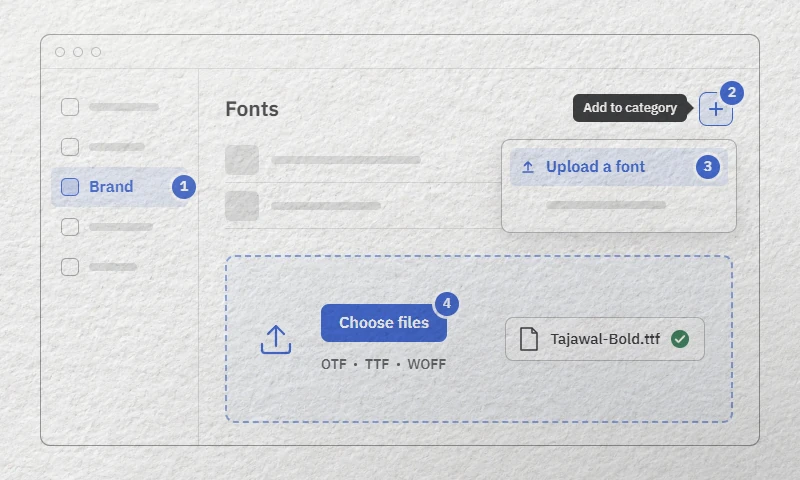
- Unzip first. Canva rejects
.zipfiles. Extract the archive and keep the.ttffiles andLICENSE.txt. - On the Canva homepage, open Brand in the side panel. If you manage several Brand Kits, pick the right one from the dropdown: uploaded fonts belong to one kit.
- Go to Fonts and click the + button (Canva’s help calls it “Add to category”).
- Select Upload a font, then drag the files in or click Choose files. Upload every weight you plan to use at once.
- Confirm and wait for the upload to finish.
On the mobile app, the same path starts from More › Brand. To use the font, select a text box, open the font list and scroll to Uploaded fonts. You can also assign it to a heading level in the Brand Kit so it appears as a ready-made style.
The rules your files must meet
| Rule (Canva Help Center) | What it means for an Arabic font |
|---|---|
| OTF, TTF or WOFF only; no ZIP, EOT, SVG or WOFF2 | Upload the TTF from the zip. Never the WOFF2 a website serves. |
| Variable fonts are not supported | A single file named like Cairo[slnt,wght].ttf will not do; you need one static file per weight. |
| Under 15 MB per file | No problem for Arabic text fonts: the largest TTF in our seven Canva-ready downloads, Amiri Regular, weighs 431 KB. |
| Up to 18 styles per family, 500 fonts per Brand Kit | Plenty: the largest static families in our table below have 7. |
| Bold and italic need their own files | If you upload only Regular, the B button stays grayed out. Upload the Bold file too. |
| The font must be licensed for embedding | Free fonts under the SIL Open Font License allow embedding; see below. |
Canva also asks you to upload only fonts you are licensed to use (section 4b of its Terms of Use). A free font under the SIL Open Font License (OFL) clears that bar: the license lets you use, embed and redistribute the font, commercially included, as long as you do not sell the font file on its own. The official steps and limits are on Canva’s page Upload and use Brand Kit fonts.
A commercial font is another matter: many desktop licenses forbid uploading the file to an online editor, as our guide to Arabic font licenses explains. If yours does, our list of free alternatives to commercial Arabic fonts suggests open families you can upload instead.
Which free Arabic fonts upload cleanly
We opened the download of each candidate in our catalog and checked three things: whether the files are static or variable, whether they carry Arabic shaping tables (initial, medial and final forms, mark positioning), and the embedding flag that Canva’s “licensed for embedding” check refers to. Every static file below has its embedding flag set to installable, the least restrictive value, plus full Arabic shaping and both Western and Arabic-Indic digits.
| Font | Files in the download | Ready for Canva? | Good for |
|---|---|---|---|
| Tajawal | 7 static TTF, ExtraLight to Black | Yes | Social posts, menus, bilingual layouts |
| IBM Plex Sans Arabic | 7 static TTF, Thin to Bold | Yes | Corporate decks, infographics |
| Almarai | 4 static TTF, Light to ExtraBold | Yes | Body text on slides and stories |
| Mirza | 4 static TTF, Regular to Bold | Yes | Longer Naskh-style text |
| Amiri | 2 static TTF, Regular and Bold | Yes | Invitations, quotations, vocalized text |
| Aref Ruqaa | 2 static TTF, Regular and Bold | Yes | Greetings with a handwritten feel |
| Lalezar | 1 static TTF | Yes | Big, loud headlines |
| Cairo, El Messiri, Reem Kufi | 1 variable TTF each | Not as downloaded | Use static files instead (see below) |
For a variable family, look for static files rather than forcing the variable one in. Google Fonts family downloads typically include a static folder with one file per weight, meant for apps that do not support variable fonts; those unchanged, official files are the ones to upload. We have not tested what Canva does if you upload a variable file anyway, since its Help Center simply says variable fonts are not supported. El Messiri has a limit of its own: on our October 2026 test lines, it detached a shadda and its vowel from the letter, mostly on a final lam, even with its original file. Keep it for headlines without vowel marks.
For headline-led work such as sales posts, flyers and banners, our page of Arabic fonts for ads and posters lists more display families; check each download against the table’s criteria before uploading.
Type, align and space Arabic text
Canva needs Arabic characters, not a font trick. Type with an Arabic keyboard layout from your operating system, or compose the line in our online Arabic keyboard (Latin letters and Arabizi such as mar7aba work) and paste it into the text box.
- Alignment. Canva’s alignment control offers Left, Center, Right and Justify. For an Arabic paragraph, choose Right: Arabic lines start on the right, and a left-aligned Arabic block looks unfinished.
- Mixed Arabic and English in one line. Canva documents no text-direction switch per text box; we found none in its Help Center. When an app sets no direction, the Unicode Bidirectional Algorithm takes the paragraph direction from its first strong letter. A line that opens with a Latin brand name is then laid out as a left-to-right paragraph, and the final full stop or question mark can land on the wrong side. Start the line with an Arabic word, or put the English part in its own text box.
- Letter spacing: leave it at 0. Canva’s Spacing sliders (Advanced settings) are tuned for Latin. Arabic letters join, so tracking only pulls a word apart. To lengthen an Arabic word, a calligrapher uses the kashida (ـ), not spaces.
- Line spacing: open it up. Vowel marks above and below the letters need room. Raise line spacing until the marks of two lines no longer touch, especially in Naskh fonts like Amiri.
- Ligatures: keep them on. Canva has a Ligatures switch under Advanced settings › More settings › Advanced › Typography. Canva does not say what it changes for Arabic, and we have not tested it. Since the lam-alif لا (lā) is mandatory in Arabic, leave it on.
- Digits. Western digits (2026) and Arabic-Indic digits (٢٠٢٦) are different characters. Canva displays whichever you type, provided the font has them. All seven Canva-ready fonts in the table include both sets.
Curved text and other effects
Canva groups its text effects into Style (Drop, Glow, Echo, Outline, Background, Splice), Color (Hollow, Glitch, Neon) and Shape, where the only option is Curve. Select the text box, click Effects on the toolbar, then pick an effect in the side panel.
Canva’s documentation says nothing about how Curve treats Arabic, and we have not tested it ourselves. Bending text means placing it along a path, and with a script whose letters must join, that is exactly where joins can open up. Before you export, zoom to at least 200% and check that every letter still meets its neighbor. If the joins break, curve a single short word, or set the curved line in a desktop app and bring it into Canva as an image.
Arabic text not working in Canva: fixes
| Symptom | Likely cause | Fix |
|---|---|---|
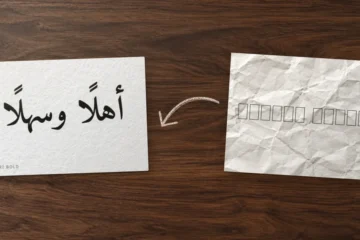
| Boxes ▯ or crossed boxes instead of letters | The font has no Arabic glyphs (Canva: the font is not supported by your language setting) | Font list › See all › Fonts in your language, or an uploaded Arabic font |
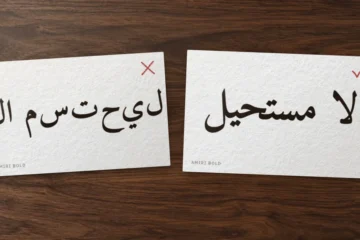
| Words read backwards, letters in the wrong order | Text pasted from a “reverse Arabic” converter made for old software | Paste the original, plain Arabic text instead |
| Letters disconnected in an uploaded font | An old font without Arabic shaping tables, or one built for a single application | Upload a font with full OpenType Arabic support, such as Tajawal or Amiri; more on why Arabic letters stop connecting |
| Upload error | ZIP, WOFF2, variable file, file over 15 MB, or you are not an owner, admin or brand designer of the team | Unzip; use static TTF or OTF; ask someone with one of those roles |
| Weights listed as separate families | Inconsistent family names inside the files | Delete them and re-upload a complete, unmodified family from the original source |
| Font looks different, or letters vanish, in the download | Canva: the font uploaded but is “not fully compatible” | Try another font; always check the exported PNG or PDF |
| Your uploaded font is missing from the list | It sits in a different Brand Kit | Switch Brand Kit from the kit name in the font panel |
The reversed-text case is common. Converters built for software that could not shape Arabic store letters in visual order, already reversed and pre-joined. An app that shapes Arabic itself then reverses them a second time. Always keep the clean original text.
On Canva Free
Without a plan that allows uploads, you have two options. First, use the Arabic fonts in Canva’s library, found with the language filter above. Second, for a single headline in a specific free font, install the font on your computer (see how to install Arabic fonts), set the headline in a desktop app (see our guide to Arabic text in Photoshop, Illustrator and InDesign), export it as a transparent PNG (or an SVG with the text converted to outlines), and upload that as an image. The text is no longer editable in Canva, so check spelling and vowel marks before you export. The OFL allows this: the font stays on your computer and only the artwork travels.
Still choosing a typeface? Start with the best free Arabic fonts we tested, then come back here to upload your pick.