How to Choose an Arabic Font: A Five-Step Method
To choose an Arabic font, work through five steps in order: inventory the jobs your text has to do, pick a style family, list your constraints, run an acceptance test with your own words, and confirm the license. The examples come from the 109 free families in our catalog, which we set on the same two vocalized test lines in October 2026. Fonts get updated, so retest each one in the live preview on its page before you commit.
Step 1: inventory the jobs your text has to do
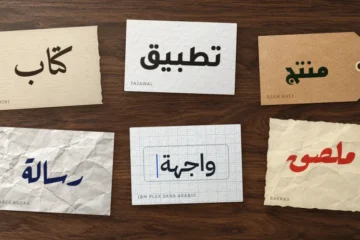
Start with an inventory, not a font menu. Every piece of Arabic in your product falls on one side of a line. A text face carries what people read for minutes: articles, reports, product pages, app content, books. A display face carries what people take in at a glance: a logo, a headline, a poster, an invitation. Teams get into trouble when one font is asked to do both, like a calligraphic title face in a settings screen, or a plain UI sans left alone on a wedding card.
Write the answers down before anyone opens a font menu:
- How long is the longest passage: a word, a line or several pages?
- Where will it be read: phone, laptop, projector, paper, a sign across the street?
- Does it need harakat (حركات), the short-vowel marks, for learners, poetry, names or religious text?
- Does it sit next to English or another Latin-script language?
- Which languages does it cover: Arabic only, or also Persian, Urdu or a West African language?
Two families cover most products: one for reading, and one for expressive headings if the brand calls for it. Each extra family is one more file to load, one more license to track and one more voice to keep consistent.
Step 2: pick a style family
Our catalog sorts its fonts into ten styles drawn from Arabic calligraphy. To an Arabic reader, each one sets a context before a single word is read, much as a serif, a monospace or a script does in English, only more strongly. Pick the style that fits the job, then compare fonts within it. To recognize the styles themselves, from the alif to the baseline, see our visual guide to Arabic calligraphy styles.
| Style | What it signals | Typical jobs | Free fonts to start with |
|---|---|---|---|
| Naskh (نسخ) | books, school, trust | long reading, vocalized text, formal documents | Amiri, Scheherazade New |
| Kufi (كوفي) | structure, heritage, architecture | logos, signage, short titles | Reem Kufi |
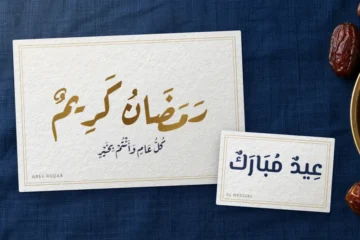
| Thuluth and Diwani (ثلث, ديواني) | ceremony, monumental calligraphy, ornament | covers, invitations, a name or a short heading | Layla Thuluth (names without harakat) |
| Ruq’ah (رقعة) | everyday handwriting, warmth | food brands, greetings, quotes | Aref Ruqaa |
| Maghribi and West African hands | regional manuscript traditions | local-language material, cultural projects | Ruwudu (Rubutun Kano) |
| Nastaliq (نستعليق) | Urdu text, Persian poetry | Urdu publishing, poetry, titles | Gulzar (check line spacing) |
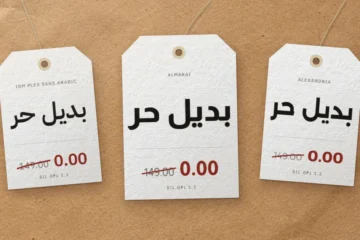
| Modern sans | current, neutral, technical | interfaces, signage, reports | IBM Plex Sans Arabic, Noto Sans Arabic |
| Display | loud, playful or retro | posters, thumbnails, book covers | Lalezar |
| Handwriting | informal, friendly | children’s material, captions | Playpen Sans Arabic |
Before you commit to a style, check its limits against the brief:
- Maghribi. The free fonts in this slot come from West Africa. Ruwudu follows the Rubutun Kano hand of northern Nigeria; if the brief asks for a Moroccan look, budget for a calligrapher.
- Nastaliq. An Arabic-language brief rarely wants it. Iranian books set their body text in Naskh; Nastaliq is Urdu’s everyday script and, in Persian, the hand of verse and calligraphy.
- Thuluth and Diwani. The fonts give you letters on a baseline. A panel with stacked, interlaced words is a calligrapher’s commission, not a typesetting job.
Step 3: list your constraints
Output: screens, print or both
Interface text is the harsh case: 12 to 14 px labels, budget Android displays, dark mode. A low-contrast sans with open counters survives there, and IBM Plex Sans Arabic ships seven weights, from 100 to 700, enough for a full component library. Long reads on screen can stay in a Naskh such as Amiri, provided the size and line height are generous. Print removes the resolution limit, and Naskh contrast and pen detail turn into assets in books, reports and certificates.
Type hierarchy: weights and axes
Map every weight in your design tokens to a real file. Single-weight families such as Lalezar, Layla Thuluth and Gulzar cannot carry a bold, so pair them with a text family that can. Variable files add more than weight: Noto Sans Arabic carries a width axis from 62.5 to 100, useful for cramped labels. Our live preview shows static instances; the ZIP keeps the original variable file with every axis.
Pairing Arabic with a Latin font
First, check what the file contains. In our measurements, 13 of the 109 families have no basic Latin A–Z at all, and the others may still lack the accented letters, curly quotes or currency signs in your copy. When the Arabic family includes a Latin drawn for it, start there: both scripts share weight steps and proportions. No matching Latin in the family? Match temperament instead, serif with Naskh, sans with sans, and expect the Arabic to look a size smaller at the same font-size; size-adjust in @font-face fixes that without touching your type scale.
Step 4: run an acceptance test with your own words
Write the test before you pick a winner: one fixed page, fixed strings, pass and fail criteria, run on every target platform. Our bench covers two lines in one browser: a vocalized verse and a row of shadda words (قَلَّ, رَبِّ, مُحَمَّدٌ…), set in all 109 families in Chrome 156 on Windows 11. The Changa, Nika and joining defects below were reproduced with the original TTF files. Your own targets need their own run.
Test environment
- Platforms. Run the page in every browser and system you ship to, typically Chrome, Safari and Firefox on Windows, macOS, iOS and Android. Each platform shapes Arabic with its own text stack, so one green run proves nothing about the others.
- Language tags and
locl. Render a final ي and a ك underlang="ar"andlang="fa"side by side. Fail if the Arabic run shows the Persian forms ی without its two dots or ک without its inner stroke, or if ٤ ٥ ٦ turn into ۴ ۵ ۶. This check is not academic: 57 of our 109 families cover Persian, Persian-first designs such as Vazirmatn (Saber Rastikerdar; Roboto-based Latin; nine weights, 100–900) included. - Fallback. Declare the full stack, then fail the font if any mark, digit or accented Latin letter on the page comes from the system fallback.
- Payload. Record the WOFF2 bytes per weight. One variable file can replace several statics, or outweigh the two weights you actually use.
- Regression. Keep the page in the repository and screenshot it in CI whenever the font files change.
Pass and fail criteria
- Shadda with a vowel. The shadda (شدّة) is the sign that doubles a consonant, and it often carries a vowel. Pass if each one stays on its letter. Fail if it floats beside the letter, as in Changa, or moves to the previous letter, as in Nika, where قَلَّ turns into قَّلَ.
- Mark fit. Fail if harakat sit at one height whatever the letter underneath. The Layla family, Layla Thuluth included, has no OpenType
markpositioning, so check its marks over alif and lam. - Joining. Pass if every letter connects, except after ا د ذ ر ز و, which never join the next letter. Fail on any other gap. One Persian display font in the catalog fails this in Chrome and with its original file, which contains no initial, medial or final forms.
- Shaping engine. Fail if Nastaliq letters break apart. Awami Nastaliq requires Graphite, which SIL documents for Firefox and LibreOffice; in Chrome our line came out disconnected.
- Line height. Pass if no mark touches the line above at your chosen
line-height. Fully vocalized text usually needs 1.8 to 2, and Nastaliq or tall designs more. - Numbers and direction. Pass if a price, a date and an English product name inside a right-to-left sentence stay in order, with Arabic-Indic digits (٠١٢٣), the Arabic comma (،) and question mark (؟) present.
Both failures show in the figure, a proverb built on the bench’s قَلَّ وَدَلَّ. Each word ends in a doubled lam: in قَلَّ it joins the qaf, in دَلَّ it stands alone because dal never connects forward.
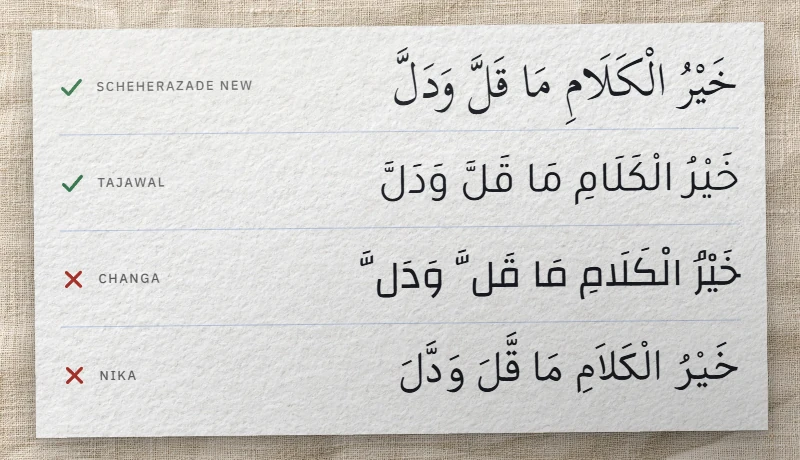
To build test strings, use our online Arabic keyboard: it converts Latin letters or Arabizi into Arabic words without harakat. Add marks letter by letter from its Shift layer, or lock them on with Marks, then paste the string into the live preview on each font page.
Step 5: confirm the license
Before a font enters a repository or a client handover, confirm which of the catalog’s three licenses covers it. Every ZIP carries the license text. Our guide to how Arabic font licenses work compares them, right by right, with system fonts and commercial EULAs.
- SIL Open Font License 1.1, 92 families. Web self-hosting, app bundles, PDF embedding and commercial products are all allowed. The font files themselves cannot be sold on their own. If you fork the font, the fork stays under the OFL and takes a new name whenever the original declares a Reserved Font Name.
- Apache License 2.0, 2 families. Commercial use is open. Commit the license and any NOTICE file with the fonts, and add a change notice to any font file you edit.
- GPL with font exception, 15 families from Arabeyes, GNU FreeFont and PakType. The exception keeps documents that embed the font outside the GPL. Distributing a modified font is different: it ships under the GPL, with its source.
In practice, commit the license next to the font files and name it in the handover notes, so the client’s next agency inherits the terms with the code. The binding wording is on the official Open Font License site and in the GNU GPL FAQ entry on fonts; our summary does not replace legal advice. Downloads labeled “free for personal use” have no place in a client repository, because those terms usually rule out commercial work.
Quick decision guide
Each row gives a starting style, a shortlist for your test page and the page that lists every suitable font for that use.
| Your project | Start with | Shortlist to test | Full list |
|---|---|---|---|
| Book, report or thesis | Naskh | Amiri, Scheherazade New | Arabic fonts for books and print |
| Website, app or dashboard | Modern sans | IBM Plex Sans Arabic, Noto Sans Arabic, Vazirmatn | Arabic web fonts for interfaces |
| Arabic and English brand | Sans or Kufi with built-in Latin | IBM Plex Sans Arabic, Reem Kufi | Arabic fonts with a matching English alphabet |
| Poster, thumbnail or campaign | Display | Lalezar | Arabic fonts for flyers and posters |
| Wedding or event invitation | Thuluth, Diwani or Ruq’ah | Layla Thuluth (names without harakat), Aref Ruqaa | Arabic wedding invitation fonts |
| Worksheets for children | Handwriting or clear sans | Playpen Sans Arabic | Arabic fonts for kids and school |
For ranked recommendations, read our tested selection of free Arabic fonts, with bench notes on each pick.
Make the call and record it
Narrow the field to two candidates and set both in the real layout, not on a specimen sheet. Keep the one that passes your acceptance test at its smallest size. If both pass, ask an Arabic reader from your audience which one fits the brand: tone is the part a non-reader cannot judge. Then write a short font record into the project:
- family name, version and where the files came from;
- weights or axis ranges you ship, with their WOFF2 sizes;
- the fallback stack and the line height you settled on;
- the license, and the path to its file.
That record spares the next redesign from repeating your tests.